Amazon Web Services Storage #
The following documentation outlines how to setup an AWS S3 bucket in storage area of ~.Dimensions.~.
Required Information
The following information from you S3 bucket are required when adding as a storage configuration:
- BUCKET
- REGION1
- KEY
- KEYSECRET
Alongside the information above, a Storage Name needs to be provided. This is how the storage will be referenced within ~.Dimensions.~.
Once this information has been entered into a ~.Dimensions.~ storage configuration and saved, the storage configuration will become available to select for new and existing customers.
Lifecycle Rules
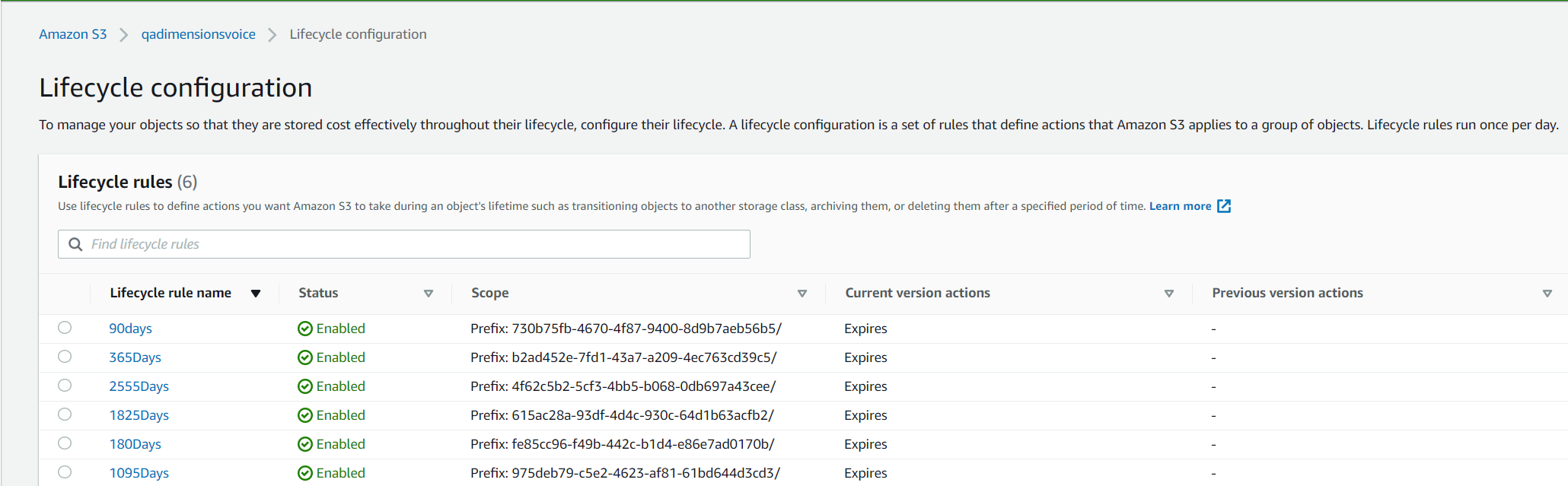
If retention profiles are being enabled for the storage configuration, corresponding lifecycle rules need to be created with in the Amazon S3 configuration. The lifecycle rules need to be created with the prefixes listed below and the corresponding number of days.
| Retention Days | GUID |
|---|---|
| 90 | 730b75fb-4670-4f87-9400-8d9b7aeb56b5 |
| 180 | fe85cc96-f49b-442c-b1d4-e86e7ad0170b |
| 365 | b2ad452e-7fd1-43a7-a209-4ec763cd39c5 |
| 1095 | 975deb79-c5e2-4623-af81-61bd644d3cd3 |
| 1825 | 615ac28a-93df-4d4c-930c-64d1b63acfb2 |
| 2555 | 4f62c5b2-5cf3-4bb5-b068-0db697a43cee |
The image below shows an example of the lifecycle configuration within AWS:
info
Ensure that lifecycle rules are created for All retention profiles with the prefix matching the predefined Ids in ~.Dimensions.~.