Call Recording #
If it has been enabled against a customer's account, ~.Dimensions.~ can provide access for users to playback telephone calls. Access to call recordings is directly through the reporting interface using the call session click through feature.
Which Calls Are Recorded? #
~.Dimensions.~ can record all calls by default or it can be managed on a user or device basis. The image below shows the flow used when deciding if a call should be recorded.
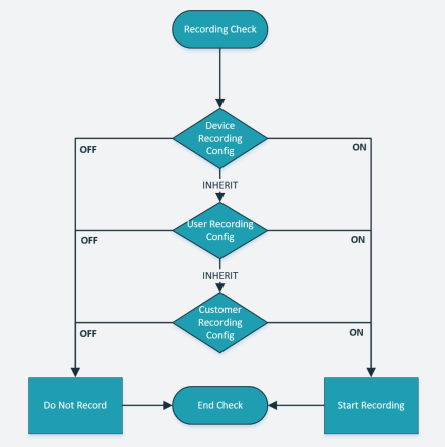
The system will check the device's recording setting, if it is specifically set to On/Off, this setting will be followed. If it is set to Inherit, the User's setting will then be checked.
User recording configuration can be changed through the Recordings tab of the user.
Device recording configuration can be changed through the Recordings tab of the device.
Examples #
Example 1
- Customer Setting -> On
- User Setting -> Inherit
- Device Setting -> Off
Result: The call will not be record. The device setting will take precedence.
Example 2
- Customer Setting -> Off
- User Setting -> On
- Device Setting -> Inherit
Result: The call will be record. The device setting is inherit so the User setting will take precedence.
info
Calls are not recorded until they reach a device or user. If you are interested in recording calls at trunk level, please contact your sales representative.
Playback Permissions #
In order for users to be able to playback call recordings, they must first have been given permission to do so. When giving a user permission, a recording access scope must be selected. The scope assigned to a user controls which calls they are allowed to playback.
| Scope | Description |
|---|---|
| Own Calls1 | Allow the user to playback only calls which they have been involved with. |
| Primary Group | Allow the user to playback any call which has been tagged with their Primary Group. |
| Member Groups | Allow the user to playback any call which has been tagged with any group they are a member of. |
| All Calls | Allows the user to playback any call which has been recorded. |
For information on providing access for users to playback calls, refer to the user permissions section.
info
'Recording Playback & Scope' - Any user with permissions to playback their own calls will be able to playback any conference they have been involved in. This may include times before they joined or after they have left the conference call.
-
Users will be able to play back their own calls if any of the other scope options are selected. ↩︎